Code, ops, inbox — everywhere, instantly.
The developer's everything-app for code, ops, and inbox. One global hotkey — SSH/SFTP, sandboxes in 13 languages, inline AI, HTTP + WebSocket, a unified inbox across seven platforms, daily notes, todos, snippets, a mobile companion PWA, and a 28-widget dashboard. The page below shows you every surface.
Foundry is the everything-app for developers and power users. A global Spotlight omnibar, multi-language sandboxes, an inline AI chat, a Postman-class HTTP / WebSocket client, a Soulver-style calc engine, daily notes, todo lists, reusable snippets, and a configurable widget dashboard — and now a full SSH/SFTP client with sixteen system-admin sidebar panels, a mobile companion PWA with automated HTTPS and native push, a unified inbox across seven external platforms, and multi-window pop-outs that travel with their state. All behind one hotkey, Ctrl+Shift+Space. One state file, one export, one matched-bundle update.
Languages
Widgets
SSH Panels
Inbox Sources
A full SSH/SFTP client with sixteen system-admin sidebar panels, a mobile companion PWA with native push and an automated HTTPS wizard, a unified inbox across seven external platforms, a WebSocket client baked into HTTP Studio, and multi-window pop-outs that travel with their state. Every byte of it ships in the same atomic, SHA-256-verified bundle.
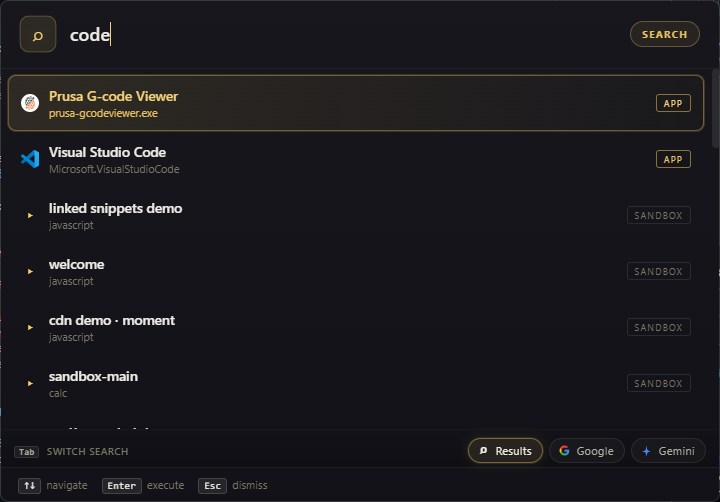
The omnibar is Foundry's central nervous system — type code, a calc expression, a URL, a curl one-liner, a regex literal, a hex color, a JSON blob, an IP address, a city, an app name, a shell command, an AI prompt; Foundry detects what you typed and routes it to the right tool. Click any prefix below to see the route fire.
Pick a route. Foundry auto-detects the input type and dispatches — no manual mode-switching, no slash-prefix gymnastics. The same omnibar opens system-wide via the native Spotlight extension.
Type anything — Foundry parses it and routes to the right inbox. Tab cycles target chips so a todo lands on the right list and a note slips into the right scope.
Results, Google, or AI — same input, three intents. A failed Results-mode query auto-falls to Google after 700ms so you always see what Enter will do.
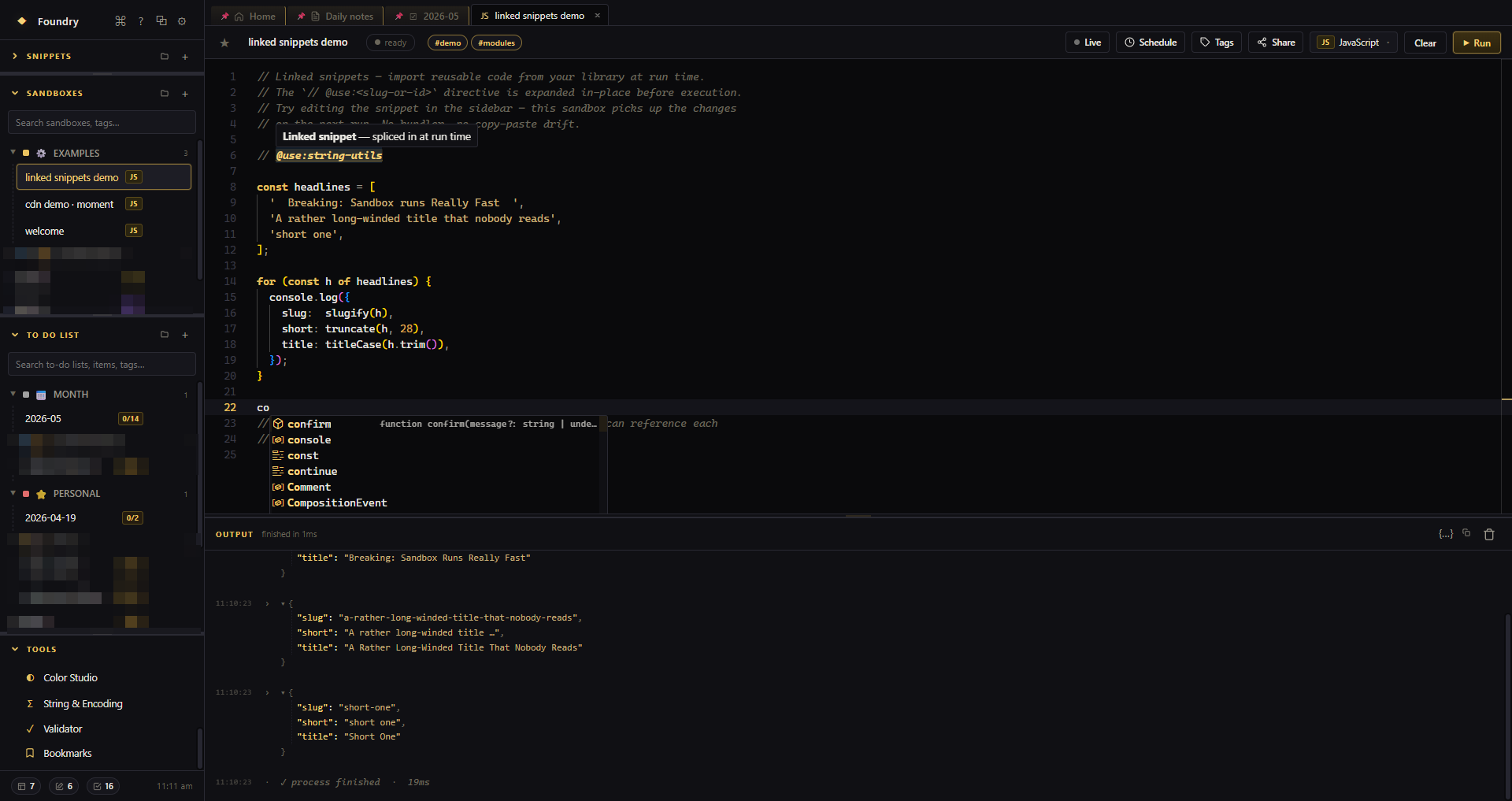
Sandboxes are not a code editor. They're an environment. JavaScript and TypeScript run in isolated iframes with full intellisense, type-aware linting, and live module imports — autocomplete, hover types, and red squigglies on save errors, plus a fetch proxy that bypasses CORS automatically. JSON, YAML, and .env get format-aware linters with jump-to-line on error. Lua runs in a full embedded runtime. Markdown live-renders. Calc evaluates every line. Sandboxes can be scheduled, scratch-live-run, linked to snippets, and pinned to the dashboard.
Click a language. Each one runs with its own runtime — TypeScript gets strict-mode diagnostics, autocomplete, and hover types straight from the language service; Calc gutter-renders results; Markdown live-previews; Lua gets the full standard library; JSON, YAML, and .env are linted with jump-to-line on error. Use the @use: directive to splice in linked snippets (reusable code) at run time.
Run any sandbox on a fixed interval with time-window guards so a 22:00→06:00 schedule actually means after-hours. Or flip scratch live-run and watch every keystroke trigger a debounced re-execute.
Pack any sandbox — code, runtime config, npm imports, scratch settings, and referenced @use: snippets — into a single shareable link. Drop it in a Discord channel, a PR comment, or a teammate's inbox; they paste it into their Foundry omnibar and the sandbox materializes ready to run — same language, same imports, same settings, none of your API keys.
One click on the share icon serializes the sandbox into a compressed, signed payload and gives you a copyable link. Your collaborator opens it in their Foundry — it lands in a new sandbox tab with code, deps, and config restored byte-for-byte.
Source, language, runtime config, scratch live-run state, and any pinned npm imports travel with the link — no manual setup on the receiving end.
Referenced @use: snippets are resolved and inlined into the payload at share time, so the recipient runs the exact code you ran.
API keys, secrets-store entries, and AI conversation history are excluded from the export — by design, never serialized into a share link.
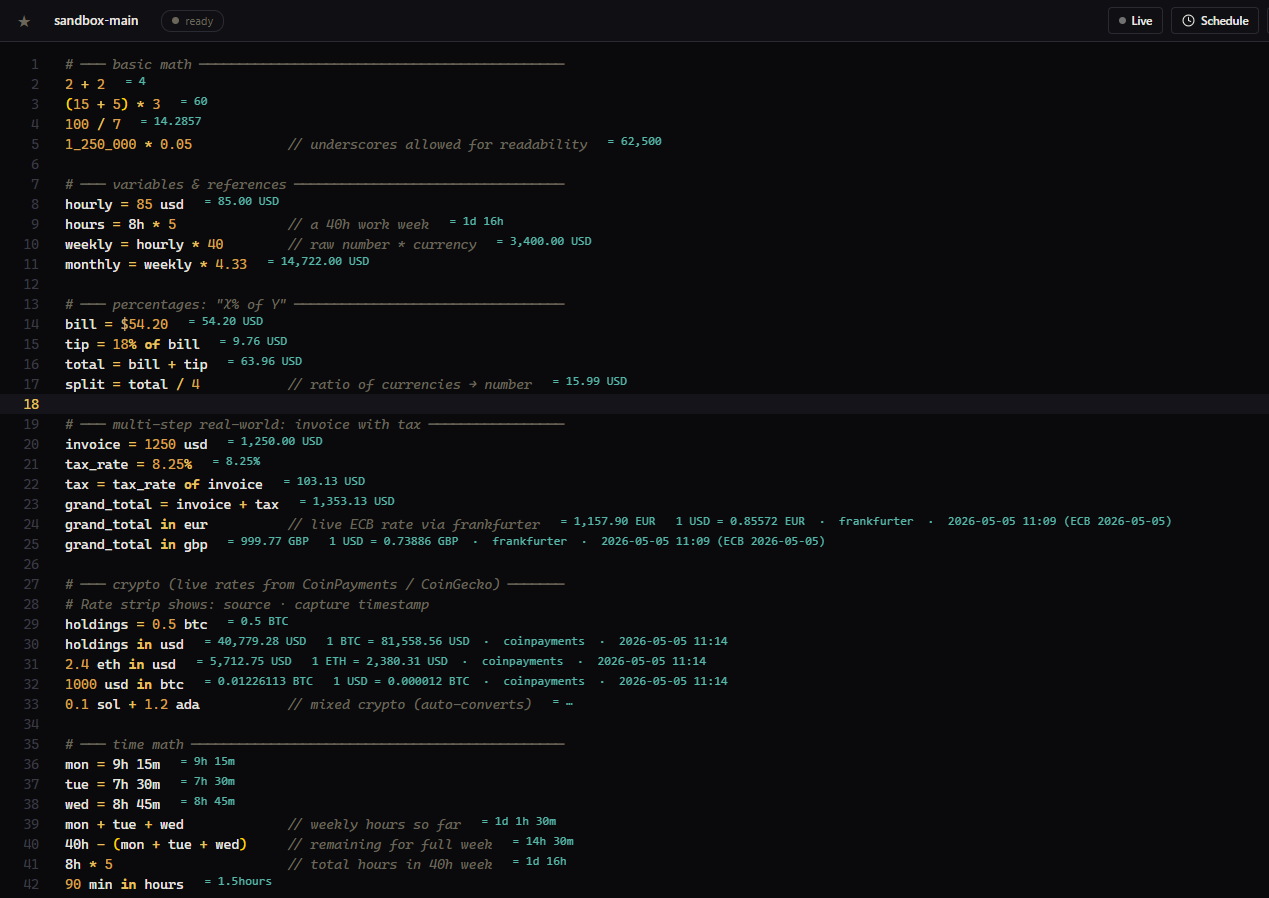
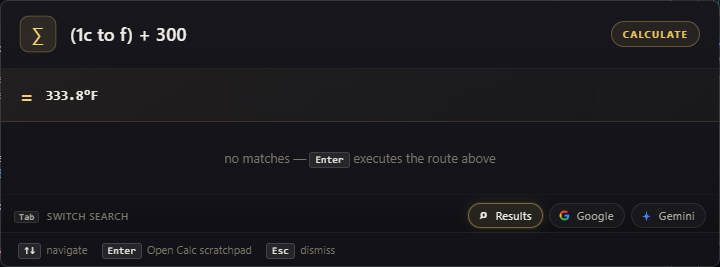
Every line evaluates. Variables persist down the file Live currency evaluation. Mixed crypto auto-converts. Dates do arithmetic. Clock-times know their timezone. Also supported in the omnibar for quick-calc operations.
Watch values resolve in the right gutter as the buffer evaluates — currency rates, crypto pricing, byte conversions, time zones, date math. Numbers update with the underlying rate, not on a refresh.
USD, EUR, GBP, JPY, CAD, AUD, CHF, CNY, HKD, SGD, INR, MXN, BRL, KRW, NOK, NZD, SEK, AED, ZAR, TRY, ILS, PLN, THB — and 14 more. ECB rates.
BTC, ETH, LTC, SOL, ADA, DOT, XRP, DOGE, BCH, LINK, UNI, AVAX, MATIC, USDT, USDC, TRX, XLM, ATOM, SHIB, NEAR. Mixed crypto auto-converts.
Bytes/bits across KB/KiB · MB/MiB · GB/GiB · TB/TiB · PB/PiB. Temperature C/F/K. Time durations. Compound math (2h 15m + 45m).
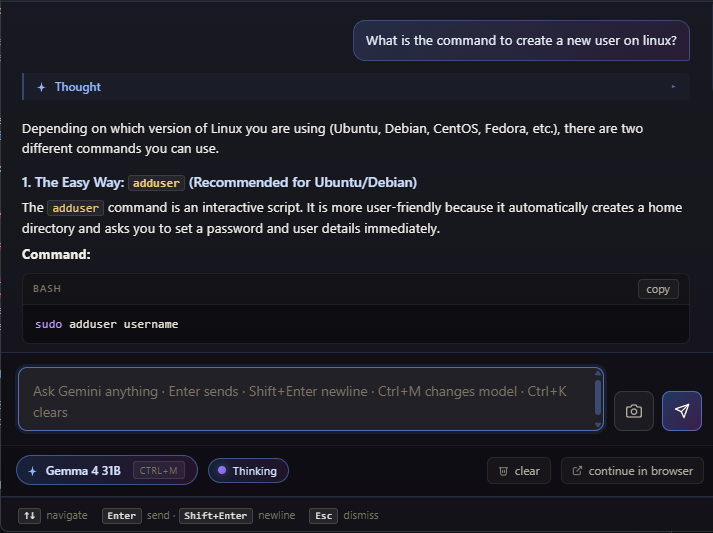
Three models on rotation — Standard (highest free-tier throughput), Fast (speed), Quality (best answers). Toggle thinking traces; the chain-of-thought streams into a collapsible block above the answer. Attach a monitor screenshot in one tap. Conversations resume across sessions; your API key is held in an isolated secrets store that is never serialized into your workspace export.
No second window. No context switch. The chat takes over the omnibar with a model picker (Ctrl+M), thinking visible (toggle), and a one-click handoff that copies the conversation as markdown and opens it in your browser. Attach a screenshot of your current screen for additional context.
Tabbed terminal sessions over a persistent PTY service. Identity manager with key generation and agent. Known-hosts trust. OpenSSH-config import. A hero connection card with phased progress (spawn → handshake → auth → shell). The SFTP browser sits next to the terminal and follows your `cd` automatically — drag in to upload, edit in place, small-file fast path streams over the existing shell channel in 25–80ms.
The terminal and the file browser are wired to one PTY. The instant your shell cds, the right pane re-lists in ~18ms. Watch the directory chip change as the flow steps through.
Double-click any file in the SFTP browser and it opens in a real editor over the same shell channel — syntax highlighting, language-aware linting with red squigglies and quick-fixes, hover types from the language service, line numbers, breadcrumbs. Ctrl+S saves through the PTY in 25–80ms versus the 0.5–2s an sftp.exe roundtrip would cost you. The file you wanted to fix is one keystroke from saved — no rsync, no temp copies, no "edit, scp back" ritual.
Phased progress: spawn · handshake · auth · shell. Live elapsed time. Equivalent `ssh …` line with copy-to-clipboard so you can leave Foundry and not lose context.
Generate ed25519 or RSA keys, sit them in the agent, and import your existing ~/.ssh/config. Known-hosts trust UI prompts on first connect — no silent acceptance.
Small-file save round-trips the shell channel in 25–80ms versus 0.5–2s with sftp.exe. Drag-and-drop upload. In-place edit. The file you wanted to fix is one keystroke from saved.
The right rail is a system-administration cockpit you can drag-reorder per-user. Disk, Docker, Network, Processes, Firewall, Systemd, Audit, Cron, Git, Logtail, Tcpdump, Stream, Team — every panel is purpose-built for SREs and ops engineers, not a generic file tree. Auto-rotate is on by default below — pause it, or pin a panel.
Each panel renders against the active SSH session. Pause to inspect — or let it cycle and absorb the breadth.
Foundry isn't just code. It's where you think, plan, and ship from one workspace. Daily notes split by scope (Personal, Work, Side Projects, Journal). Todo lists grouped into colored folders with sections, subtasks, and deadline urgency. Snippets that splice into any sandbox via the @use: directive at run time.
A per-date journal split into scopes — Personal, Work, Side Projects, Journal, or any folder you create. Each scope is a separate markdown block on the day's page with autosave, smart list continuation, and a streak badge that counts consecutive writing days. Capture a single line via note: text in the omnibar — Tab cycles target scopes.
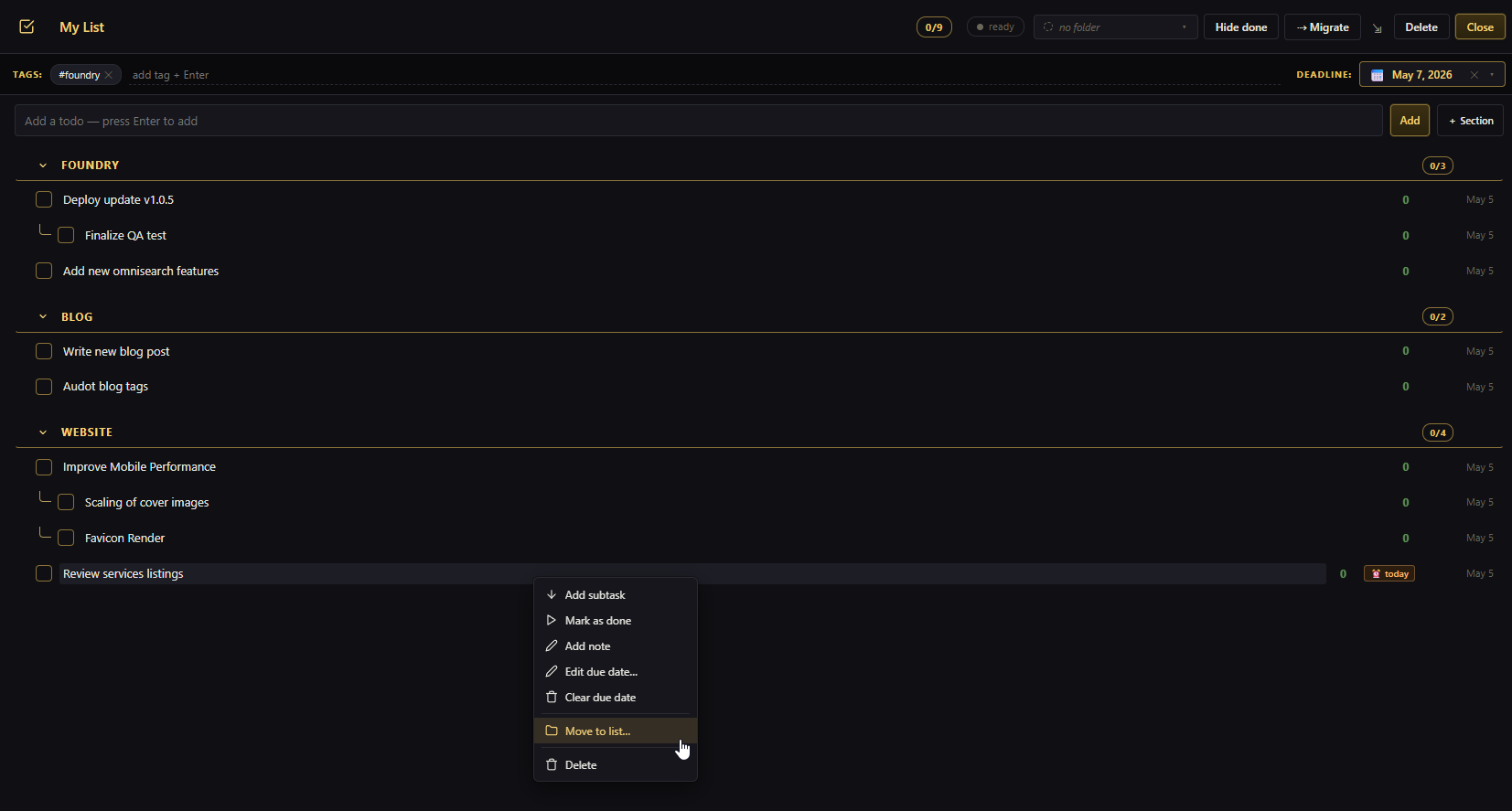
Lists live inside colored folders (Personal, Work, Side Projects, Errands — your call), each with its own icon and color. Sections, subtasks (Tab to indent), deadline urgency chips, hide-done, drag-aware subtree reorder, and migrate-unfinished carry-over.
Save reusable code or markdown blocks with a title, tags, and folder. Drop // @use:slug on its own line in any sandbox and Foundry splices the snippet's body in at run time — recursive expansion (snippets that reference snippets), cycle detection, max depth 8.
Slack, Mattermost, GitHub, GitLab, Linear, Intercom, PagerDuty — every work signal lands in one place with four-tier priority chips you can override per item, day-grouped cards, search, snooze, archive, mark-read, and a full-screen thread modal for chat platforms. Mark a conversation unread in Slack or Mattermost and it surfaces as a card here with a "Marked unread" reason. Plus an overlay drawer you can summon from anywhere in the app — same items, same filters, no need to open the full tool.
Click any card on the left and the thread expands on the right — full message body, reactions, a reply composer that posts back to the source platform, and one-tap actions for read / snooze / archive / open-in-app. Profile photos render from each platform's authenticated avatar endpoint.
Urgent · High · Normal · Low. User-editable per item and persisted across polls. Override is visually distinct from the adapter's default and resettable.
Explicitly mark a Slack or Mattermost conversation unread and it surfaces here as a card. Mattermost detection uses a last_viewed_at regression and persists across restarts.
Surfaces recently-read items from every source — not just Intercom — and survives a restart via a per-source 7-day / 100-item retention window.
Every tool is starable, drag-reorderable, openable in split view, and addressable from the omnibar via tool:. Pipe data between them — paste JSON in the omnibar, it opens in the JSON Viewer; paste a regex literal, it opens the Regex Tester; paste a curl one-liner, it builds an HTTP Studio request.
Hover a tool for details. The HTTP Studio pane alone has a full pro-grade HTTP client built in — environments, folders, copy-as-curl, JSON tree responses.
All the methods, all the auth modes, key/value tables for headers and params, raw and JSON bodies, environments with {{var}} interpolation across every field, request folders, copy-as-curl, and a curl-paste route in the omnibar that builds requests from one-liners.
Connect to any ws:// or wss:// endpoint, send text, JSON, or binary frames, watch the framed history with direction arrows, pin frames you want to re-send, and route Bearer / Cookie / custom headers through the connect upgrade. The same environments and {{var}} interpolation that drive your REST requests apply here — one tool, two protocols, zero context switch.
A live ticker stream. New frames roll in on the left, pinned frames stay on the right ready to re-send, and the composer round-trips JSON, text, or binary back to the server.
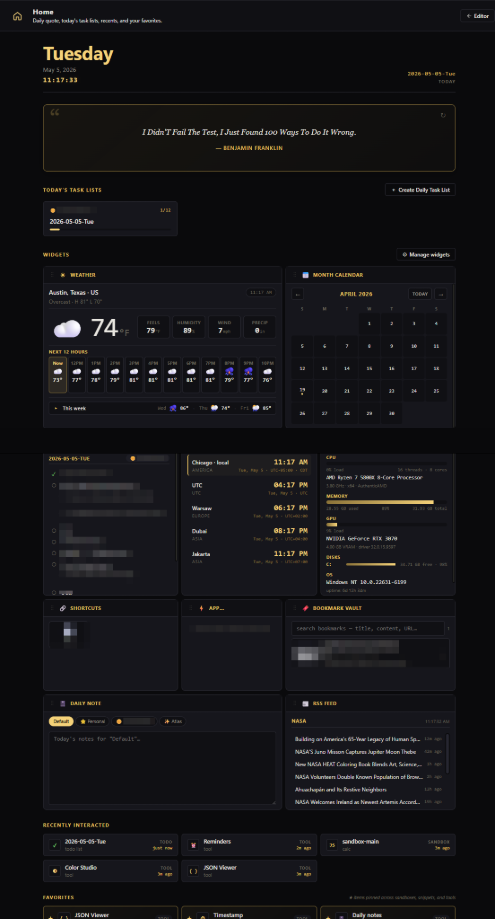
Every widget is resizable, collapsible, refresh-interval-aware, and per-widget render-error-isolated. Pin sandbox output. Track a USPS package. Watch your git status. Fire a pomodoro. Grow a habit streak. The grid persists; one click moves a widget; soft-refresh preserves your focus and scroll.
A scaled-down fragment of the real grid. Everything below is configurable in the widget manager — order, size, refresh, source.
The dashboard should be yours to customize. An ever-growing widget catalog, and custom output display from your scripts.
Pair your phone to Foundry over a paired domain, and the desktop becomes a server only for you. The HTTPS wizard issues a real Let's Encrypt certificate via Cloudflare DNS-01, binds it to the listener, and auto-renews at 30 days from expiry. WebAPK installs and OS-level push notifications work from any phone on the network. All local — no third-party relay, no telemetry. Source CRUD stays on the desktop because phones aren't for editing config.
Watch the phone cycle through tabs. Spawn an SSH session from a saved-hosts list — htop, vim, less, tmux all render natively. Read the inbox. Mark a todo done. Ack a reminder. Every action round-trips to the desktop instantly.
The thing nobody else automates. Foundry runs the cert dance for you so your phone gets a real green padlock — and renews itself forever.
Full xterm with Ctrl-C / Ctrl-D / Ctrl-L / Tab / Esc control row, soft-keyboard column-resize, and clipboard paste. vim, htop, less, tmux all render.
OS-level banners for fired reminders and high-priority inbox items. Tap a banner to deep-link into the matching tab — phone unlocks straight into Foundry.
Distinct 'Can't reach Foundry' screen with manual Retry plus auto-retry every 5s. A network blip doesn't confuse the user with a re-pair prompt.
Foundry isn't a browser app shoehorned into a window. It ships a compiled native spotlight overlay that claims the global hotkey at the OS level, mounts on the active monitor with the Windows 11 acrylic/Mica backdrop, and bridges to the main app over a loopback channel protected by a per-boot cryptographic token.
The same Ctrl+Shift+Space opens Foundry from VS Code, your browser, Slack — anywhere. The hotkey is dynamically released when Foundry's main window is foreground so the in-app DOM keydown fires natively (zero IPC lag); the native binary re-grabs it on focus loss.
Manifest checks every four hours. SHA-256 verification before anything in the install dir is touched. Backup-to-.foundry-bak before swap. Rollback on any failure. Network drop mid-download leaves your install untouched.
Pop-outs aren't throwaway helpers — they're full clients of the same local Foundry core that owns your shared state. SSH sessions stay alive when you tear them off into their own window. State is consistent across every window because all writes flow through one engine. Tab drag-and-drop reliably transfers tabs between windows instead of falling through to a fresh pop-out — the change that turned multi-monitor from a hack into a workflow.
The main window, the SSH pop-out, the inbox pop-out — all three point at the same local Foundry core. Drag a tab between any two. Close the main window and the pop-outs keep working.
Pop an SSH session out, and the PTY keeps running. Close the main window — the session is still there. Re-dock it. Move it across monitors. Same shell.
Every window writes through the same dispatcher. Concurrent updates from any window land consistently. No stale tab in a corner monitor showing yesterday's todos.
Drop a tab onto another window's tab bar and it docks. No more accidental new windows when you meant to move a tab. The bug everyone wanted fixed — fixed.
Not modules. Not add-ons. Every Foundry installation ships with the complete bench — and every over-the-air update is a matched bundle that delivers new widgets, omnibar evaluators, calc units, and tools without a manual reinstall.
Tabbed terminal sessions over a persistent PTY service. Identity manager, known-hosts trust, OpenSSH-config import, hero connection card with phased progress. SFTP browser follows the active shell's cwd automatically; small-file fast path saves in 25–80ms with in-place editing (intellisense + linting).
System Stats · Files · Snippets · Disk · Docker · Network · Processes · Firewall · Systemd · Audit · Cron · Git · Logtail · Tcpdump · Journal · Team. Drag-reorderable, per-user persisted, purpose-built for SREs and ops engineers.
Pair your phone over a paired domain. Six-step HTTPS wizard issues a real Let's Encrypt cert via Cloudflare DNS-01 and auto-renews. Eight bottom-nav tabs: Sessions, Inbox, Notes, Todos, Reminders, Schedules, Sandboxes, Settings. Native OS push. All local — no relay.
Slack, Mattermost, GitHub, GitLab, Linear, Intercom, PagerDuty — plus webhook source and Foundry tasks. Four-tier priority chips, mark-unread parity, in-thread modal with reply composer, AI summarize. Overlay drawer accessible from anywhere in the app.
HTTP Studio is also a full WebSocket client: connect ws:// or wss://, send text / JSON / binary frames, view framed history with direction arrows, pin frames for re-send, route Bearer / Cookie / custom headers through the upgrade. Same environments and {{var}} interpolation as REST.
Pop-out windows are first-class clients of the same local Foundry core. SSH sessions stay alive when popped out. State stays consistent across windows. Tab drag-and-drop reliably transfers tabs instead of falling through to a fresh pop-out.
Ctrl+Shift+Space from any application — VS Code, browser, Slack — opens an input that routes 26+ kinds of input intelligently.
JS, TS (strict), Lua, Markdown, Calc, JSON, HTML, CSS, Shell, Python, SQL, YAML (linted), .env (linted) — node module imports, scratch live-run, schedules.
37 fiat currencies (ECB rates), 20 cryptos (live spot prices), full SI/IEC bytes, time durations, dates, 250+ city aliases for clock-time math.
Three-model rotation (Standard, Fast, Quality), thinking traces, screenshot attach, persistent conversations, one-click handoff that copies the conversation as markdown and opens it in your browser.
All methods, all auth modes, environments with {{var}} interpolation, folders, copy-as-curl, JSON tree responses, curl-paste route.
Drag-and-drop 12-column grid. Weather, world clock, RSS, stocks, crypto, todos, daily notes, pomodoro, sysinfo, git status — all configurable.
JSON Viewer, Regex, Timestamp, HTTP Studio, Diff, Color Studio, String, Validator, Bookmarks, Reminders, Daily Notes — all addressable from the omnibar.
Code + markdown snippets resolved by id, slug, or slugified title — recursive expansion, cycle detection, MAX_DEPTH 8, spliced into sandboxes at run time.
Per-date journal split into scopes (Personal, Work, Side Projects, Journal — your folders). Streak badge counts consecutive days. Smart markdown textarea with list continuation, tab indent, autosave.
Sections, subtasks (Tab indents), per-task due dates with overdue/today/soon urgency chips, priorities, hide-done, drag subtree-aware reorder, migrate-unfinished carry-over. Lists grouped into colored folders.
Parse 'in 15m', 'tomorrow at 9am', 'every Mon 10am'. Daily/weekly recurrence. Native OS notifications + in-app toast. Snooze 5m / 1h, ack, cancel, delete. Live countdown on the home dashboard.
Offline-archived URLs with title, description, OG/Twitter meta, favicon, og:image, and 5,000-char readable text. Full-text search across captured content. 4 sort modes.
Type anything in the omnibar — Foundry detects URL, todo, note, snippet, reminder, curl, JSON, color, timestamp, regex, validator, calc, sandbox, hash, list, folder — and routes it to the right inbox.
Collapse to a 520×420 always-on-top floater while you work in another IDE. Drag tabs to split-pane any sandbox/tool/todo against any other.
Pinned tabs persist and reopen on launch (auto-sort to the left, lock indicator, no close button). Unpinned tabs are session-scoped. Drag to reorder; middle-click closes.
Round-trip your entire workspace — sandboxes, snippets, todos, folders, HTTP requests, environments, bookmarks, daily notes, reminders, widget layout, theme overrides — as one JSON file. Move setups between machines or share with a teammate.
Full-screen guided walkthrough on first launch covering every workspace surface — Home, sandboxes, scheduling, linked snippets, todos, daily notes, bookmarks, reminders, HTTP Studio, calc, mini mode, theme editor, settings, hotkeys. Replay any time.
Compiled binary, Windows-11 Mica/acrylic backdrop, multi-monitor placement, app-index search with frecency ranking, alpha-preserving icon extraction.
Manifest poll every 4h. Verified before swap. Backup-to-.foundry-bak. Rollback-on-failure. Network drop mid-download leaves install untouched.
state.json with .tmp + rename atomic writes, .bak recovery chain, quarantine on corruption. 120ms debounced, sync-flushed on window close.
Every CSS surface variable is user-pickable via a built-in color wheel. Every action is click-to-record rebindable. Ships with the prestigious gold-on-near-black palette that matches the Foundry crest; reset is one click.
Registry-based architecture for widgets, omnibar evaluators, quick-capture kinds, validator formats, calc units, and language metadata. New entries arrive over the air as matched bundles — no manual reinstalls.
Foundry collapses your spotlight, scratchpad, calc, AI chat, HTTP / WebSocket client, SSH terminal, mobile companion, unified inbox, daily notes, todos, snippets, and dashboard into one cohesive desktop workspace. One state file, one export, one matched-bundle update. Ever-expanding — new capabilities arrive over the air.
Real questions from buyers and integrators — straight answers.
Foundry is a Windows desktop workspace built for developers, SREs, and power users. One global hotkey (Ctrl+Shift+Space) opens an omnibar that intelligently routes anything you type — code in 13 languages, calc expressions across 37 currencies, AI prompts, shell commands, IP lookups, base64 encode/decode, app launches, URL captures, fuzzy workspace search. It ships a full SSH/SFTP client with sixteen system-admin sidebar panels, a mobile companion PWA with automated HTTPS, a unified inbox across seven external platforms, a Postman-class HTTP + WebSocket client, multi-window pop-outs, a 28-widget configurable dashboard, the eleven-tool workspace (JSON viewer, regex tester, color studio, validator, diff viewer, daily notes, todos, reminders, bookmarks), and an atomic SHA-256-verified over-the-air auto-updater.
Thirteen first-class languages with intellisense: JavaScript, TypeScript (with strict-mode diagnostics), Lua, Markdown (live preview), Calc (Soulver-style reactive scratchpad), JSON, HTML, CSS, Shell, Python (highlighted), SQL, YAML (linted), and .env (linted). JavaScript and TypeScript run in isolated iframe sandboxes with node module imports, top-level await, and a fetch proxy that falls back through native HTTP to bypass CORS. Sandboxes can be linked together with @use: directives, scheduled to run on intervals with time-window guards, and pinned to the dashboard for live output.
Calc is a Soulver-style reactive scratchpad — every line evaluates, results render in the gutter, and variables persist down the file. It supports number bases (hex, binary, octal), variables, percentages, time durations (mixed units like "2h 15m + 45m"), bytes and bits across the full SI + IEC matrix, temperature, 37 fiat currencies via Frankfurter (ECB), 20 cryptocurrencies, dates with arithmetic ("today + 14 days", "next friday - today"), and timezone-aware clock-times for 250+ city aliases.
Yes. The mobile companion is a real PWA installed via WebAPK over a paired domain. A six-step HTTPS wizard issues a real Let's Encrypt certificate via Cloudflare DNS-01, binds it to the listener, and auto-renews at 30 days from expiry — your phone trusts your machine like any public site, no self-signed prompts, no cloud relay. Eight bottom-nav tabs (Sessions, Inbox, Notes, Todos, Reminders, Schedules, Sandboxes, Settings) cover the whole workspace. You can spawn or attach to SSH sessions from your phone with native Ctrl-C / Ctrl-D / Ctrl-L / Tab / Esc bindings, ack a reminder, mark a todo done, or read an inbox thread. OS-level push notifications fire for reminders and high-priority inbox items, and tapping a banner deep-links into the matching tab.
Nine sources: Slack, Mattermost, GitHub, GitLab, Linear, Intercom, PagerDuty — plus a generic webhook source and an internal Foundry-tasks source. Per-source settings, group filtering, search, day-grouped cards, snooze, archive, mark-read, AI summarize, and a full-screen thread modal for chat platforms with profile photos rendered from each platform's authenticated avatar endpoint. Four-tier priority chips (Urgent / High / Normal / Low) are user-editable per item and persisted across polls — the override is visually distinct from the adapter's default and resettable. Explicitly marking a conversation unread in Slack or Mattermost surfaces it as a card with a 'Marked unread' reason (respected in Foundry and persists across restarts). The inbox is also available as an overlay drawer accessible from anywhere in the app.
Foundry ships an inline AI chat in the same omnibar — no second window, no context switch. Three models on rotation (Standard for highest free-tier throughput, Fast for low-latency replies, Quality for the best answers) with thinking-trace streaming, monitor-aware screenshot attach, and persistent per-conversation history. Conversations resume across sessions, and a one-click handoff copies the full chat to your clipboard as markdown and opens it in your browser so you can continue elsewhere. Your API key is held in an isolated secrets store — never serialized into your workspace export.
Foundry ships a compiled native overlay that claims Ctrl+Shift+Space at the OS level, so the omnibar opens from any application — VS Code, browser, Slack, anywhere. The hotkey is dynamically released when Foundry's main window is foreground so the in-app keydown fires natively (zero IPC lag). The overlay is pre-warmed at startup, summons on the active monitor (DPI-aware, multi-monitor), and uses the Windows 11 acrylic/Mica backdrop. A loopback bridge with a per-boot cryptographic token drops IPC latency from hundreds of milliseconds down to ~10–20ms.
Yes. Foundry ships a tabbed SSH/SFTP terminal over a persistent PTY service with an identity manager (ed25519 + RSA key generation, agent forwarding), known-hosts trust UI, OpenSSH-config import, and a hero connection card with phased progress (spawn → handshake → auth → shell) and live elapsed time. The SFTP browser sits next to the terminal and follows your shell's `cd` automatically — drag files in to upload, double-click to edit in place with syntax highlighting, language-aware linting, hover types, and quick-fixes. The small-file fast path round-trips saves through the existing shell channel in 25–80ms versus the 0.5–2s an `sftp.exe` roundtrip would cost. Per-host snippets run on the box. Omnibar support lets you open any host by name.
Sixteen purpose-built system-admin panels that render against the active SSH session, all drag-reorderable with per-user persistence: System Stats (CPU/mem/load/network/top procs), Files (SFTP pinned to cwd), Snippets (per-host, run on box), Disk (per-mount bars with `du` drill-down and a 2-minute LRU cache), Docker (containers + images, CPU/mem bars, aggregate memory pill), Network (Connections/Listening/Tcpdump sub-tabs), Processes (ancestor-guided tree with PID-keyed lookup for 500-row tables), Firewall (auto-detect nft vs iptables), Systemd (unit list with enable-state pills and journal grep), Audit (rolling event log with discovered IPs), Cron (inline editor), Git (branch/status with preflight cache), Logtail (with regex highlight and match-nav scrub bar, streaming tail -F with regex highlight and first/prev/next/last match navigation), Tcpdump (live capture with BPF input), Journal (per-unit journalctl drill-down for foundryd, postgres, nginx, redis, audit-daemon, etc.), and Team (peer presence with 1s relative-time updates).
Daily notes are a per-date journal organized by scopes — Personal, Work, Side Projects, Journal, or any folder you create. Each scope is its own markdown block on the day's page, with autosave, smart list continuation (Enter on a bullet keeps the list going), tab-to-indent, and a streak badge that counts consecutive days you've written. Switch scopes via filter pills, jump days from the sidebar, capture a quick line via 'note: text' in the omnibar (Tab cycles target scopes).
Todo lists support sections, subtasks (Tab to indent, Shift+Tab to outdent), per-task due dates with overdue/today/soon urgency badges, priorities, hide-done, drag-aware subtree reorder, and 'migrate unfinished' carry-over to a new list. Lists live inside folders that ship 8 colors and 56 emoji icons, so you can group by category — Work, Personal, Side Projects, Errands. Daily lists auto-name as YYYY-MM-DD and surface on the home dashboard. Capture a task via 'todo: text' in the omnibar; Tab cycles target lists.
Snippets are reusable code or markdown blocks — title, body, language, tags, folder. The killer feature is @use: linking: drop '// @use:snippet-slug' on its own line in any sandbox and Foundry splices the snippet's body in at run time, with recursive expansion (snippets that reference snippets), cycle detection, and a max depth of 8. Snippets can be referenced by id, slug, or slugified title. Markdown snippets get an Edit/Preview toggle; code snippets pick their language and run inside the sandbox iframe.
Pop-out windows are first-class clients of the same local Foundry core that owns your shared state. SSH sessions stay alive when you tear them off into their own window — pop the main window closed and the session keeps running. Tab drag-and-drop reliably transfers tabs between windows instead of falling through to a fresh pop-out (the change that turned multi-monitor from a hack into a workflow). State is consistent across every window because all writes flow through one engine — no stale tab in a corner monitor showing yesterday's todos.
Yes — every color preview surfaces all the codes side-by-side: HEX (#D4AF37), RGB (rgb(212, 175, 55)), HSL, OKLCH, OKLab, lab, lch, hwb, and the CSS color() function form. Drop any color string into the omnibar (#hex, rgb(), hsl(), oklch(), etc.) and Color Studio opens with that color preloaded. Generate palettes (3–8 swatches) across seven harmony modes, lock individual swatches, and run a WCAG contrast check against any 'vs' target with AA, AA-large, and AAA pass/fail badges.
Same shape, but it lives in the same hotkey as everything else and shares state with your sandboxes, snippets, and notes. Full method support, key/value tables for headers and params, raw and JSON bodies, four auth modes (none, bearer, basic, API key), {{var}} environment interpolation across all fields with inline gold-highlighted resolution, request folders with hierarchical organization, copy-as-curl, and a curl-paste route in the omnibar that builds a request from a one-liner. Response inspection includes interactive JSON tree, headers tab, and a raw tab with truncation.
Yes. Connect any `ws://` or `wss://` endpoint, send text / JSON / binary frames, watch the framed history with direction arrows (▲ tx, ▼ rx), pin frames you want to re-send, and route Bearer / Cookie / custom headers through the connect upgrade. The same environments and `{{var}}` interpolation that drive your REST requests apply to WebSocket too — one tool, two protocols, zero context switch. The full REST side is still there: all methods, all auth modes, key/value tables for headers and params, raw and JSON bodies, request folders with hierarchical organization, copy-as-curl, and a curl-paste route in the omnibar that builds a request from a one-liner.
A 12-column drag-and-drop grid hosting 28+ configurable widgets: world clock, weather, RSS reader, stocks, crypto, calendar, todos-today, daily note scratchpad, pomodoro, quick-calc, habit tracker, package tracker (USPS/UPS/FedEx/DHL/Amazon/OnTrac/Royal Mail with carrier auto-detect), system info (CPU/RAM/GPU/disk), git status (branch, ahead/behind, dirty count), app launcher tiles, URL shortcuts, embedded iframes, sandbox output pinning, bookmarks, reminders, notepad, markdown blocks, year-progress, time-since, countdown, and a workspace-counts panel. Each widget is resizable, collapsible, and per-widget refresh-interval-aware.
Atomic, SHA-256-verified, and rollback-safe. The updater polls a signed manifest (first check 30s after boot, then every 4 hours), downloads the app, resources, and spotlight overlay as one matched bundle into a staging directory, verifies every artifact's SHA-256 before touching the install directory, then waits up to 30s for processes to release file locks, backs up each target file, atomically swaps in the new version, and restores from backup on any failure. New widgets, omnibar evaluators, calc units, languages, and tools arrive over the air without manual installs.
Yes — every CSS surface variable is exposed via a color picker (surfaces, text, accent gold, semantic colors), and every action is click-to-record rebindable. The default theme is a prestigious gold palette on near-black, matching the Foundry crest. Reset to defaults is one click. The whole workspace — sandboxes, snippets, todos, folders, HTTP requests, environments, bookmarks, daily notes, reminders, widget layout, theme overrides — round-trips as a single JSON export so you can move setups between machines or share with a teammate.